Most access failures fall into five buckets. Work through them in this order before opening a ticket. It saves a support round-trip.
1. "Account suspended or blocked".
Check your inbox for an outstanding KYC verification request. Unfinished verification is the most frequent cause of a soft lock. Also consider whether you, or a duplicate account under the same name or IP, triggered a security review. Then contact 24/7 live chat and ask three precise questions: what is blocked, why, and which document unblocks it?
2. Geo-restriction and VPN conflicts.
If you travel outside Canada, an IP from a restricted jurisdiction can end the session or block login entirely. Using a VPN to disguise location generally breaches operator terms and can freeze funds. Log in from a genuine Canadian IP. If you are abroad temporarily, contact support before attempting deposits or withdrawals.
3. Browser cache and cookie errors.
Symptoms: the login page reloads endlessly, the button does nothing, or you are logged out instantly. Clear cookies and cache for the site, disable aggressive ad-blockers and anti-tracking extensions for that domain, or open the site in a private window to confirm the account itself is fine.
4. Two-factor authentication failures.
A rejected six-digit code is almost always clock drift. Enable automatic date and time on the phone so the authenticator stays in sync. Lost the device? You will need identity verification through support to reset 2FA. Keep backup codes somewhere offline.
5. Repeated failed attempts.
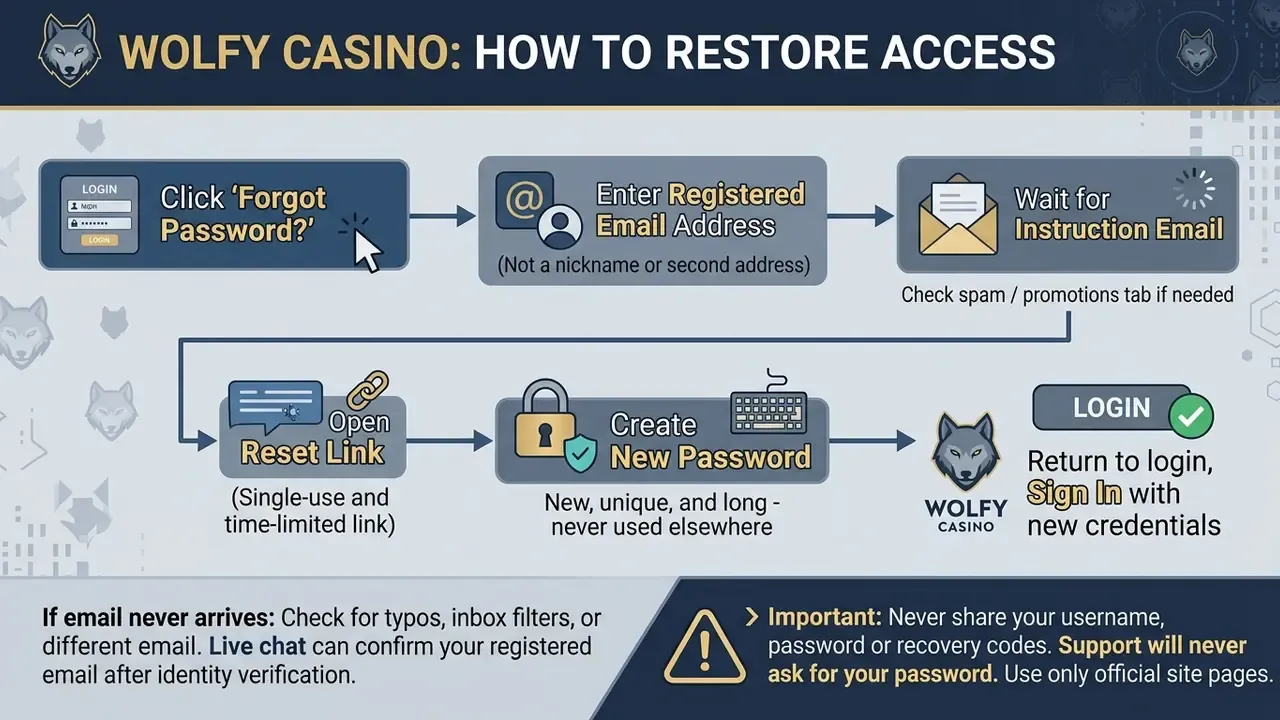
Rate limiting exists on most platforms. After several misses, the form may reject even correct credentials for a cooling-off window. Wait, then reset the password rather than guessing again.
Still stuck? Contact live chat with: your username (never your password), the email on file, the exact on-screen error text, device, OS and browser, the approximate time of the attempt, and a screenshot. That package usually turns a multi-day thread into one reply.